> For the complete documentation index, see [llms.txt](https://doc.ozforensics.com/oz-knowledge-ru/llms.txt). Markdown versions of documentation pages are available by appending `.md` to page URLs; this page is available as [Markdown](https://doc.ozforensics.com/oz-knowledge-ru/rukovodstva/rukovodstvo-razrabotchika/api/oz-api/rabota-s-konteinerom-dannykh-ozcapsula.md).
# Работа с контейнером данных OzCapsula
### Конфигурация Oz API
Основное изменение в работе с API — это новый content type для передачи данных. Контейнер представляет собой бинарный файл, поэтому установите `Content-Type` = `application/octet-stream`. Поддержка этого типа добавлена вместе с функциональностью контейнера.
#### Примеры
{% hint style="info" %}
Обратите внимание: в настоящее время поддерживается только [однозапросный сценарий работы](/oz-knowledge-ru/rukovodstva/rukovodstvo-razrabotchika/api/oz-api/otpravka-na-analiz-edinym-zaprosom.md).
{% endhint %}
`POST api/folders`:
```bash
curl -X POST \
'{{host}}/api/folders' \
-H 'Content-Type: application/octet-stream' \
-H 'X-Forensic-Access-Token: ' \
--data-binary '@/path/to/container.dat'
```
`POST api/instant/folders`:
```bash
curl -X POST \
'{{host}}api/instant/folders' \
-H 'Content-Type: application/octet-stream' \
-H 'X-Forensic-Access-Token: ' \
--data-binary '@/path/to/container.dat'
```
Для Instant API также потребуются публичный и приватный ключи. Пути к этим ключам должны быть указаны в переменных `OZ_JWT_PRIVATE_KEY_PATH` и `OZ_JWT_PUBLIC_KEY_PATH` в файле конфигурации.
Генерация ключей:
```bash
# Generate private key:
openssl ecparam -name secp384r1 -genkey -noout | openssl pkcs8 -topk8 -nocrypt -out ./jwt.key
# Generate public key:
openssl ec -in ./jwt.key -pubout -out ./jwt.pub
```
### Возможные ошибки
| **Код ошибки** | **Сообщение** | **Описание** |
| -------------- | -------------------- | -------------------------------------------------------------------------------------------------------------------------------------------------------------------- |
| 3 | Invalid request data | Отсутствует payload.json |
| 4 | Invalid request data | В контейнере нет медиафайлов |
| 5 | Invalid request data | Контейнер поврежден |
| 13 | Invalid request data | API не получил контейнер |
| 14 | Invalid request data |
В контейнере обнаружены ошибки, распаковка невозможна,
В режиме Full API назначили повторный анализ для медиафайла, уже получившего FAILED
|
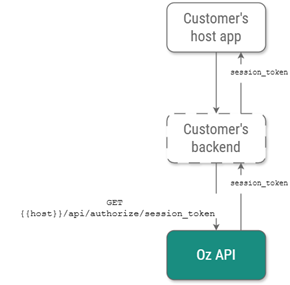
## Получение Session Token
До начала работы с SDK получите session token:
1. (Опционально, только для stateful API) авторизуйтесь с любой ролью, кроме OPERATOR.
2. Вызовите метод `GET {{host}}/api/authorize/session_token`.
**Пример запроса**
```bash
curl -L 'https://{{host}}/api/authorize/session_token' \
-H 'X-Forensic-Access-Token: ' \
-H 'Content-Type: application/json'
```
**Пример ответа**
```bash
{
"session_token": ""
}
```
---
# Agent Instructions
This documentation is published with GitBook. GitBook is the documentation platform designed so that both humans and AI agents can read, navigate, and reason over technical content effectively. Learn more at gitbook.com.
## Querying This Documentation
If you need additional information that is not directly available in this page, you can query the documentation by asking a question.
Perform an HTTP GET request on the following URL with the `ask` and `goal` query parameters:
```
GET https://doc.ozforensics.com/oz-knowledge-ru/rukovodstva/rukovodstvo-razrabotchika/api/oz-api/rabota-s-konteinerom-dannykh-ozcapsula.md?ask=&goal=
```
`ask` is the immediate question: it should be specific, self-contained, and written in natural language.
`goal` is what the user is ultimately trying to achieve, the reason they need the answer. Sharing it helps GitBook give you a better, more relevant answer. A goal is most helpful when it describes the outcome the user wants rather than restating the question. For example, with `ask=how do I create an API token`, a goal like `automate deployments from our CI pipeline` lets GitBook tailor the answer to that use case.
The response will contain a direct answer to the question and relevant excerpts and sources from the documentation.
Use this mechanism when the answer is not explicitly present in the current page, you need clarification or additional context, or you want to retrieve related documentation sections.