> For the complete documentation index, see [llms.txt](https://doc.ozforensics.com/oz-knowledge/llms.txt). Markdown versions of documentation pages are available by appending `.md` to page URLs; this page is available as [Markdown](https://doc.ozforensics.com/oz-knowledge/general/oz-liveness-and-biometry-key-concepts/oz-licensing-options.md).
# Oz Licensing Options
For commercial use of Oz Forensics products, a license is required. The license is time-limited and defines the software access parameters based on the terms of your agreement. Some product features are also controlled by the license:
| Feature | Description | Additionally charged |
| ---------------------------- | ----------------------------- | -------------------- |
| `features.watermark` | Displays logo (Oz by default) | Yes, for hiding logo |
| `features.version-on-screen` | Displays SDK version | No |
| `configs.custom_logo` | Displays a custom logo | Yes |
Once you initialize mobile SDK, run Web Plugin, or use Oz Bio, the system checks if your license is valid. The check runs in the background and has minimal impact on the user experience.
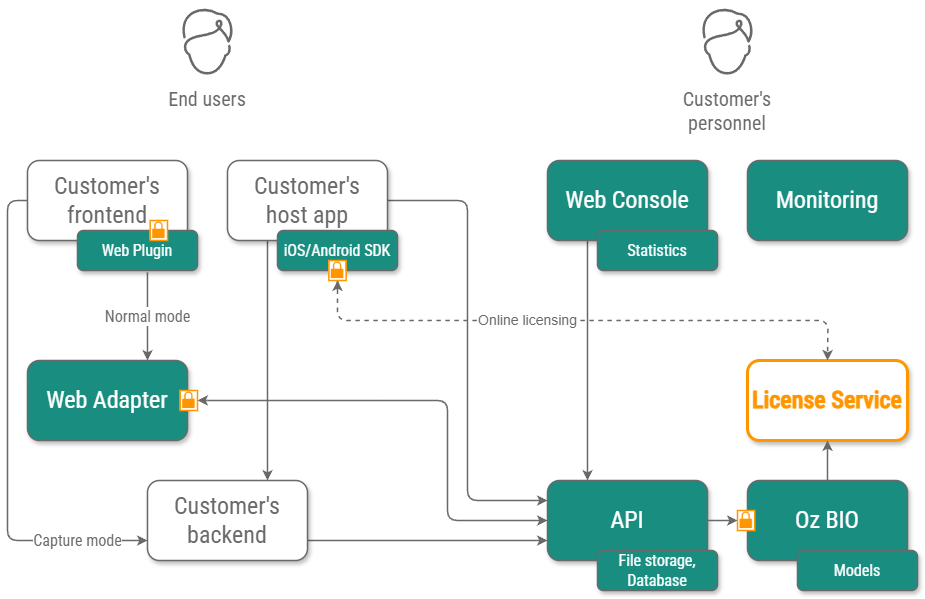
As you can see on the scheme above, the license is required for:
* Mobile SDKs for iOS and Android,
* Web SDK, which consists of Web Adapter and Web Plugin,
* Oz BIO, which is needed for server analyses and is installed for [On-Premise model of use](/oz-knowledge/general/oz-liveness-and-biometry-key-concepts/saas-on-premise-on-device-what-to-choose.md).
For each of the components, you require a separate license which is bound to this component. Thus, if you use all three components, three licenses are required.
## Native SDKs (iOS and Android)
To issue a license for mobile SDK, we require your bundle (application) ID. There are two types of licenses for iOS and Android SDKs: online and offline.
### Online license
{% hint style="danger" %}
This functionality will be disabled in future releases. Do not build integrations that depend on it.
{% endhint %}
As its name suggests, an online license requires a stable connection. Once you initialize our SDK with this license, it connects to our license server and retrieves information about license parameters, including counters of transactions or devices, where:
* Transaction: increments each time you start a video capture.
* Device: increments when our SDK is installed on a new device.
The online license can be transaction-limited, device-limited, or both, according to your agreement.
Please note that even though on-device analyses don’t need the Internet themselves, you still require a connection for license verification.
### Offline license
Offline license is a type of license that can work without Internet. All license parameters are set in the license file, and you just need to add the file to your project. This license type doesn’t have any restrictions on transactions or devices.
The main benefit of the offline license is its autonomy, allowing it to function without a network connection. However, when your license expires, and you add a new one, you’ll require to release a new version of your application in Google Play and App Store. Otherwise, the SDK won’t function.
How to add a license to mobile SDK:
* [Android](/oz-knowledge/guides/developer-guide/sdk/oz-mobile-sdk/android/getting-a-license-for-android-sdk.md)
* [iOS](/oz-knowledge/guides/developer-guide/sdk/oz-mobile-sdk/ios/getting-a-license-for-ios-sdk.md)
## Web SDK
Web SDK license is almost similar to the mobile SDK offline license. It can function without network connection, and the license file contains all the necessary parameters, such as expiration date. Web SDK license also has no restrictions on transactions or devices.
The license is bound to URLs of your domains and/or subdomains. To add the license to your SDK instance, you need to place it to the Web SDK container as described [here](/oz-knowledge/guides/administrator-guide/configuration/web-adapter/installation-and-licensing.md). In rare cases, it is also possible to [add a license via Web Plugin](/oz-knowledge/guides/developer-guide/sdk/oz-liveness-websdk/web-plugin/no-server-licensing.md).
The difference between Mobile SDK offline license and Web SDK license is that you don’t need to release a new application version when Web SDK license is renewed.
## On-premise (Oz BIO or server license)
For on-premise installations, we offer a dedicated license with a limitation on activations, with each activation representing a separate Oz BIO seat. This license can be online or offline, depending on whether your Oz BIO servers have internet access. The online license is verified through our license server, while for offline licenses, we assist you in [setting up an offline license server](/oz-knowledge/guides/administrator-guide/license-server.md) within your infrastructure and activating the license.
## Trial
For test integration purposes, we provide a free trial license that is sufficient for initial use, such as testing with your datasets to check analysis accuracy. For Mobile SDKs, you can generate a one-month license yourself on our website: [click here](https://ozforensics.com/developers/try_mobile_sdk). If you would like to integrate with your web application, please [contact us](mailto:info@ozforensics.com) to obtain a license, and we will also assist you in configuring your dedicated instance of our Web SDK. With the license, you will receive credentials to access our services.
Once you're ready to move to commercial use, a new production license will be issued. We’ll provide you with new production credentials and assist you with integration and configuration. Our engineers are always available to help.
Our software offers flexible licensing options to meet your specific needs. Whether you prioritize seamless updates or prefer autonomous operation, we have a solution tailored for you. If you have any questions, please contact us.
---
# Agent Instructions
This documentation is published with GitBook. GitBook is the documentation platform designed so that both humans and AI agents can read, navigate, and reason over technical content effectively. Learn more at gitbook.com.
## Querying This Documentation
If you need additional information that is not directly available in this page, you can query the documentation by asking a question.
Perform an HTTP GET request on the following URL with the `ask` and `goal` query parameters:
```
GET https://doc.ozforensics.com/oz-knowledge/general/oz-liveness-and-biometry-key-concepts/oz-licensing-options.md?ask=&goal=
```
`ask` is the immediate question: it should be specific, self-contained, and written in natural language.
`goal` is what the user is ultimately trying to achieve, the reason they need the answer. Sharing it helps GitBook give you a better, more relevant answer. A goal is most helpful when it describes the outcome the user wants rather than restating the question. For example, with `ask=how do I create an API token`, a goal like `automate deployments from our CI pipeline` lets GitBook tailor the answer to that use case.
The response will contain a direct answer to the question and relevant excerpts and sources from the documentation.
Use this mechanism when the answer is not explicitly present in the current page, you need clarification or additional context, or you want to retrieve related documentation sections.